

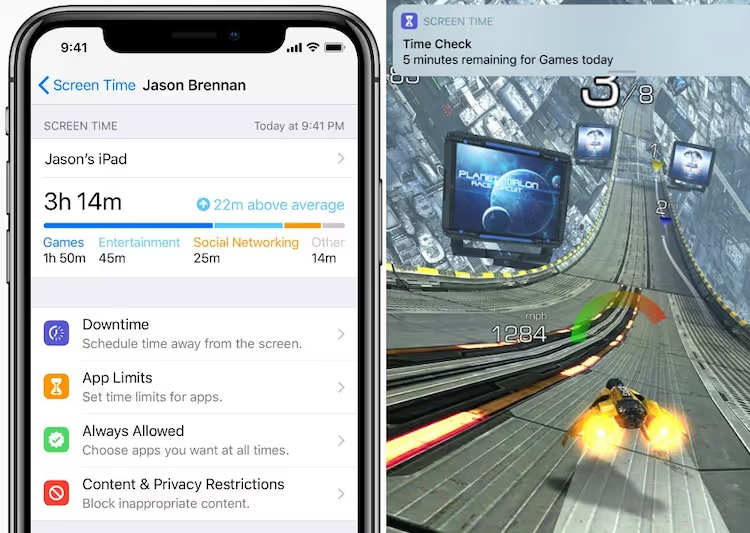

Apple’s latest operating system, iOS 12’s new Screen Time, is the feature parents have been waiting for. With it, we have a new tool to help prevent excessive screen time for our youth, as well as ourselves. The tool lets us limit overall time and allow you to limit the time on specific apps. It also does the same for websites and video games. This is a game changer because when these controls are built into the machine itself, it makes it nearly impossible for anyone to find ways around the restrictions on the devices.
Let's start with school hours. As you know we are working hard with the AwayForTheDay.org campaign to have phones be put away during school time. Some schools still allow students to carry phones and now with Screen Time, it will be possible to have things like Snapchat, Fortnite, and Instagram not be accessible on your students’ iOS devices during school hours.
Screen Time is not just for phones, but also for iPads. While some schools have some controls on them, this new tool will let parents help ensure time grabbers can be prevented during school hours— the parents have to setup Screen Time, the schools do not have access to its controls. Preventing video games and other things from being accessible during school hours helps students focus on their classes.
What about how this now helps home life?
The goal of using something like this is to not over-parent, over-control, but to set up systems that help lessen the parent-child conflict. For example, rather than track down your tween to get the phone at say, 9 pm, the phone can be configured to have all apps go off at 9 pm, including texting.
Adopting any new technology often sends chills down my spine. For those of you who feel the same way, I’ve included step-by-step instructions below on how to set this up. You and your child’s devices both have to be set up for this to work.
Even before setting up the system, I really recommend being strategic about how you go about doing this with your youth—minimizing any possible push back. Consider starting with an evening of talking about all the wonderful things that do happen on screens. It is critical that our kids know that we get it, that we understand that screen time is really cool. When they believe we know there are many great things happening on screens, then they will be more willing to see our efforts to limit constant temptation as help, not punishment.
Another way to minimize the conflict is to start by having them, and yourself, collect data on personal daily use patterns, which Screen Time lets you do. Tracking and discussing use patterns can be an effective way to think about time limits.
All Apple devices that you will be adding restrictions to—iPhones and iPads—need to be updated to iOS 12. Here is a step-by-step guide to walk you through setting up yours and your kids’ devices with these new controls.
As a note, Google has similar controls for Android phones that can be managed through its Family Link app, but this is limited to 13-year-olds and younger, leaving teenagers unsupervised on their devices. Many cell phone carriers have special plans and others ways to limit access to and time on apps as well.
If you know anyone with kids who might benefit from having help in preventing excessive screen time with their kids, please forward this TTT to them.


Learn more about showing our movies in your school or community!
Join Screenagers filmmaker Delaney Ruston MD for our latest Podcast

Learn more about our Screen-Free Sleep campaign at the website!
Our movie made for parents and educators of younger kids
Learn more about showing our movies in your school or community!
Register your interest in bringing our new movie to your school or community
Learn more about showing our movies in your school or community!
Join Screenagers filmmaker Delaney Ruston MD for our latest Podcast
Learn more about our Screen-Free Sleep campaign at the website!
Our movie made for parents and educators of younger kids
Join Screenagers filmmaker Delaney Ruston MD for our latest Podcast
Register your interest in bringing our new movie to your school or community

As we’re about to celebrate 10 years of Screenagers, we want to hear what’s been most helpful and what you’d like to see next.
Please click here to share your thoughts with us in our community survey. It only takes 5–10 minutes, and everyone who completes it will be entered to win one of five $50 Amazon vouchers.
Apple’s latest operating system, iOS 12’s new Screen Time, is the feature parents have been waiting for. With it, we have a new tool to help prevent excessive screen time for our youth, as well as ourselves. The tool lets us limit overall time and allow you to limit the time on specific apps. It also does the same for websites and video games. This is a game changer because when these controls are built into the machine itself, it makes it nearly impossible for anyone to find ways around the restrictions on the devices.
Let's start with school hours. As you know we are working hard with the AwayForTheDay.org campaign to have phones be put away during school time. Some schools still allow students to carry phones and now with Screen Time, it will be possible to have things like Snapchat, Fortnite, and Instagram not be accessible on your students’ iOS devices during school hours.
Screen Time is not just for phones, but also for iPads. While some schools have some controls on them, this new tool will let parents help ensure time grabbers can be prevented during school hours— the parents have to setup Screen Time, the schools do not have access to its controls. Preventing video games and other things from being accessible during school hours helps students focus on their classes.
What about how this now helps home life?
The goal of using something like this is to not over-parent, over-control, but to set up systems that help lessen the parent-child conflict. For example, rather than track down your tween to get the phone at say, 9 pm, the phone can be configured to have all apps go off at 9 pm, including texting.
Adopting any new technology often sends chills down my spine. For those of you who feel the same way, I’ve included step-by-step instructions below on how to set this up. You and your child’s devices both have to be set up for this to work.
Even before setting up the system, I really recommend being strategic about how you go about doing this with your youth—minimizing any possible push back. Consider starting with an evening of talking about all the wonderful things that do happen on screens. It is critical that our kids know that we get it, that we understand that screen time is really cool. When they believe we know there are many great things happening on screens, then they will be more willing to see our efforts to limit constant temptation as help, not punishment.
Another way to minimize the conflict is to start by having them, and yourself, collect data on personal daily use patterns, which Screen Time lets you do. Tracking and discussing use patterns can be an effective way to think about time limits.
All Apple devices that you will be adding restrictions to—iPhones and iPads—need to be updated to iOS 12. Here is a step-by-step guide to walk you through setting up yours and your kids’ devices with these new controls.
As a note, Google has similar controls for Android phones that can be managed through its Family Link app, but this is limited to 13-year-olds and younger, leaving teenagers unsupervised on their devices. Many cell phone carriers have special plans and others ways to limit access to and time on apps as well.
If you know anyone with kids who might benefit from having help in preventing excessive screen time with their kids, please forward this TTT to them.
Sign up here to receive the weekly Tech Talk Tuesdays newsletter from Screenagers filmmaker Delaney Ruston MD.
We respect your privacy.
Apple’s latest operating system, iOS 12’s new Screen Time, is the feature parents have been waiting for. With it, we have a new tool to help prevent excessive screen time for our youth, as well as ourselves. The tool lets us limit overall time and allow you to limit the time on specific apps. It also does the same for websites and video games. This is a game changer because when these controls are built into the machine itself, it makes it nearly impossible for anyone to find ways around the restrictions on the devices.
Let's start with school hours. As you know we are working hard with the AwayForTheDay.org campaign to have phones be put away during school time. Some schools still allow students to carry phones and now with Screen Time, it will be possible to have things like Snapchat, Fortnite, and Instagram not be accessible on your students’ iOS devices during school hours.
Screen Time is not just for phones, but also for iPads. While some schools have some controls on them, this new tool will let parents help ensure time grabbers can be prevented during school hours— the parents have to setup Screen Time, the schools do not have access to its controls. Preventing video games and other things from being accessible during school hours helps students focus on their classes.
What about how this now helps home life?
The goal of using something like this is to not over-parent, over-control, but to set up systems that help lessen the parent-child conflict. For example, rather than track down your tween to get the phone at say, 9 pm, the phone can be configured to have all apps go off at 9 pm, including texting.
Adopting any new technology often sends chills down my spine. For those of you who feel the same way, I’ve included step-by-step instructions below on how to set this up. You and your child’s devices both have to be set up for this to work.
Even before setting up the system, I really recommend being strategic about how you go about doing this with your youth—minimizing any possible push back. Consider starting with an evening of talking about all the wonderful things that do happen on screens. It is critical that our kids know that we get it, that we understand that screen time is really cool. When they believe we know there are many great things happening on screens, then they will be more willing to see our efforts to limit constant temptation as help, not punishment.
Another way to minimize the conflict is to start by having them, and yourself, collect data on personal daily use patterns, which Screen Time lets you do. Tracking and discussing use patterns can be an effective way to think about time limits.
All Apple devices that you will be adding restrictions to—iPhones and iPads—need to be updated to iOS 12. Here is a step-by-step guide to walk you through setting up yours and your kids’ devices with these new controls.
As a note, Google has similar controls for Android phones that can be managed through its Family Link app, but this is limited to 13-year-olds and younger, leaving teenagers unsupervised on their devices. Many cell phone carriers have special plans and others ways to limit access to and time on apps as well.
If you know anyone with kids who might benefit from having help in preventing excessive screen time with their kids, please forward this TTT to them.

More than half of teens ages 12–17 don’t know what sextortion is, despite nearly 1 in 5 reporting they experienced it as minors. New data from Thorn shows sextortion often involves demands for more images, in-person meetings, or ongoing relationships, and increasingly includes deepfake images. Awareness, clear definitions, and knowing where to get help are critical for prevention and response.
READ MORE >
So what is pornography, and how do we talk with our young people about this prickly topic? Every time I sit down to write about this, I feel a bit of sadness and, frankly, disbelief. It’s hard to accept that we’ve created a society where youth can be just a click away from all sorts of highly explicit sexual material. And yes, parental controls and blockers can help, but the internet is everywhere, and chances are, they will see things somewhere. But we have to talk about it.
READ MORE >
In today's blog I introduce and give a brief summary of my recent podcast conversation with Jo-Ann Finkelstein, PhD, psychologist and author of Sexism and Sensibility, where we spoke about many topics such as how to raise girls with fierce ambition and critical awareness of gender inequality without making them feel disheartened? And how we can help boys understand the hidden costs of rigid masculinity without shaming them into silence?
READ MORE >for more like this, DR. DELANEY RUSTON'S NEW BOOK, PARENTING IN THE SCREEN AGE, IS THE DEFINITIVE GUIDE FOR TODAY’S PARENTS. WITH INSIGHTS ON SCREEN TIME FROM RESEARCHERS, INPUT FROM KIDS & TEENS, THIS BOOK IS PACKED WITH SOLUTIONS FOR HOW TO START AND SUSTAIN PRODUCTIVE FAMILY TALKS ABOUT TECHNOLOGY AND IT’S IMPACT ON OUR MENTAL WELLBEING.